How skills and agents work in AWS Quick
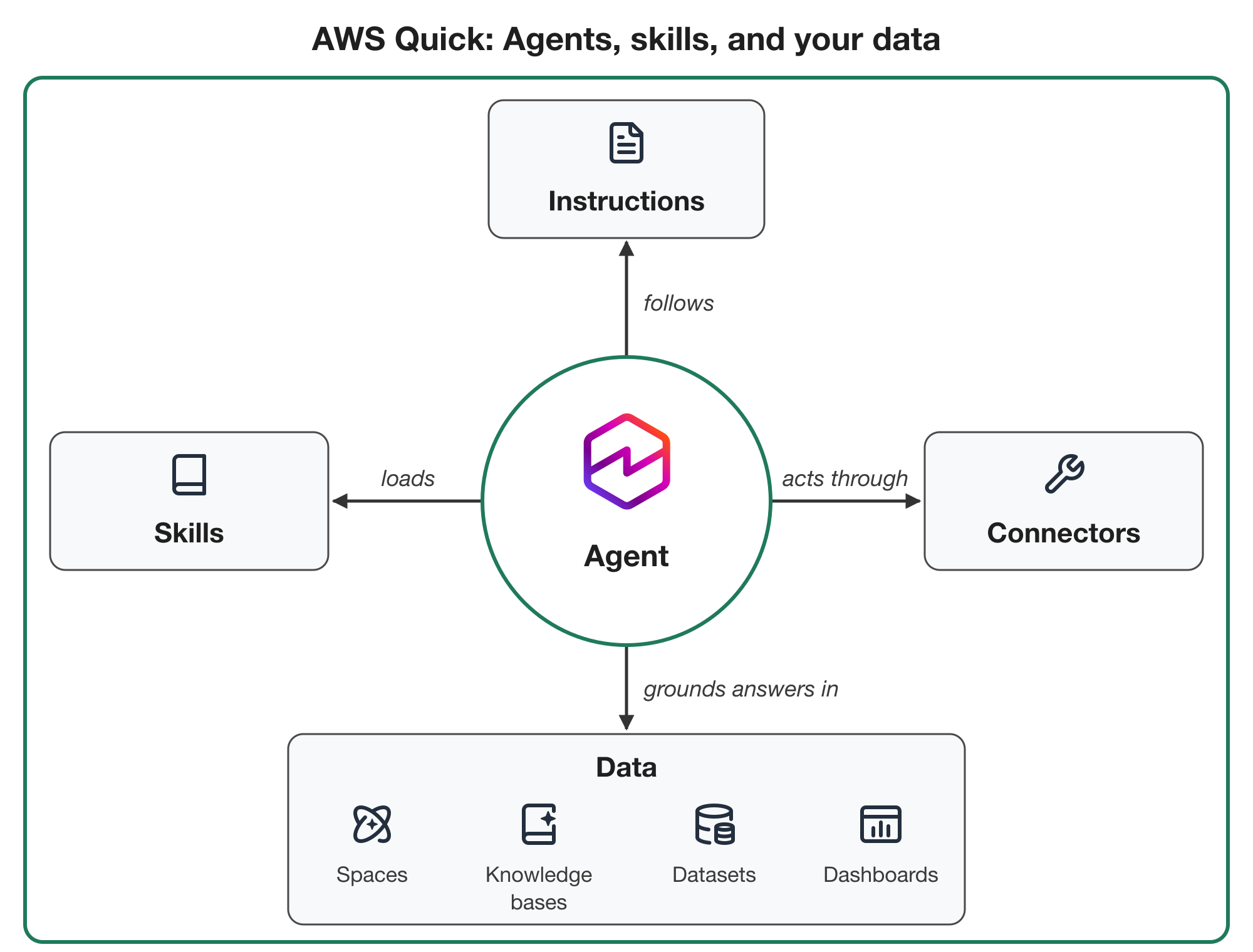
AWS published a technical walkthrough of how agents, skills and connected data fit together in AWS Quick, its AI service for automating tasks, analyzing data, building web applications and running research. The post covers the building blocks of the product, how a skill is structured and loaded, how to create and share one, and how the official catalog relates to custom agents. It also points to a recorded session and a workshop for teams that want to go deeper.
An agent in Quick is a configurable AI with its own instructions, knowledge sources and connectors, used to answer questions and complete work. Agents can run in chat or on their own through a routine. Scope is enforced at the user level: an agent can only reach resources and services that the person using it can reach, and the person who configures it decides what it is allowed to do. Quick is the default built-in agent available to every user, with no fixed scope, so each conversation draws on whatever spaces, knowledge bases, dashboards, connectors and skills the user can access. A custom agent is configured for one job, such as an HR onboarding assistant answering new-hire questions from the HR team's space, and can be limited to specific spaces, connectors and skills, tested, published and shared with users and groups inside the same Quick account.
The data layer has four main pieces. A space is a curated collection of documents and Quick resources that an agent uses as a source, personal or shared with a team or group, and can hold uploaded files and folders plus assets such as dashboards, knowledge bases, action connectors and datasets. Attaching a space to a conversation narrows the data used for it; adding one to an agent makes it part of that agent's configuration. A knowledge base is an indexed, retrieval-oriented collection synced on a schedule from sources including Google Drive, Microsoft OneDrive, Confluence, Microsoft SharePoint, Amazon S3, a web crawler and Amazon Bedrock Managed Knowledge Bases. Datasets and dashboards come from Quick Sight, the business intelligence capability available in accounts provisioned through the AWS Management Console; datasets carry semantically rich metadata over structured data such as database tables so natural-language analysis can handle complex cases. Connectors link Quick to external applications and native tools. Cloud connectors cover services such as Microsoft Outlook, Slack, Jira, Asana and Salesforce plus remotely hosted Model Context Protocol servers and work on every device; local connectors run on the user's own machine, such as a self-hosted MCP server, and are only available while that machine is on and connected.
A skill is a reusable set of instructions teaching an agent a specific task, and the post frames skills as the foundation of how an agent in Quick behaves. Agents run in a harness, a managed agent loop following the reasoning and acting (ReAct) pattern, in which a prompt is resolved using the agent's available tools and instructions; the same model-driven loop underlies frameworks such as the Strands Agents SDK. Out of the box, system skills drive much of what Quick does: generating Word, PowerPoint, Excel and PDF documents (using bundled scripts to create or edit files), browsing the web, running code, executing deep research, transcribing audio and video, and generating images. Other system skills manage Quick itself, including building Quick Flows, scheduling routines, handing work to a coding agent such as Kiro, managing memories and the knowledge graph, and tracking to-dos. Users can toggle system skills on or off but cannot edit, duplicate, export, publish, share or delete them.
Skills follow the Agent Skills specification, which Anthropic originally developed and released as an open standard. Quick on desktop, in preview since April 2026 and generally available since September 2026, uses that specification. A skill is a folder with a Markdown file named SKILL.md at its root, plus optional scripts and reference files. Frontmatter between two triple-dash lines carries the name, description and other metadata; the post shows a shortened release-notes-generator example whose description lists trigger phrases. Name and description matter most for triggering. Quick uses progressive disclosure: the agent sees only each skill's name and description until a request calls for the skill, then loads the full instructions, so phrases like asking for release notes for a specific version help route a request. The specification caps names at 64 characters and descriptions at 1,024 characters, and recommends keeping instructions under 5,000 tokens. This loading scheme is a practical design constraint: the description is effectively the retrieval index, so vague or overlapping descriptions will cause misfires or missed skills, and detail belongs in the body rather than the summary.
Skills can be created from chat, from a .md or .zip file, or from a folder with SKILL.md at its root. The chat route accepts a description of the recurring task: cadence, sources and how to query them, the transformation steps, the report format or an example, the recipients and the connector, plus a request to propose test scenarios. A previously working multi-turn conversation can also be turned into a skill. Sharing is a two-step flow: publish the draft from the Skills panel under Customize, then choose Share to pick people or groups. Publishing alone grants no access. Recipients add the skill from Shared with me, and their copy stays in sync with later publishes.
The post's production guidance treats skills like code. Because instructions may depend on connectors and data sources, document prerequisites, for example in a README, and when sharing an agent that uses a skill, also share the sources it needs, since otherwise recipients only get answers from sources they can already access. Plan for failures by stating validation and fallback behavior in the instructions, such as confirming a report appears in the Sent folder and, if not, stopping and telling the user it was not sent, which matters most for scheduled runs with no human in the loop. Test every change in the environment downstream users will have. Also avoid hardcoded values that vary per person, such as user paths or channel names, and declare them as inputs; record change dates and the origin of reference files; store a checksum to detect drift; check structure after edits the way a linter would; and keep skills consistent so teammates can review changes.
For teams that would rather not assemble all of this themselves, the Quick official catalog offers pre-built resources, including skills, that can be installed as-is or adapted. AWS says every catalog resource is tested and scanned for quality, security and other factors before publication, and the skills span everyday productivity, functions such as sales, marketing, HR, legal, project management, customer success and software engineering, and industries including finance, healthcare and life sciences, energy and utilities, hospitality, and supply chain and logistics. The catalog includes a Skill Architect skill that applies the engineering practices automatically; it can be installed via Customize, Skills, Browse all, Official, by searching for skill architect.
When configuring an agent, you set its name, description and instructions and choose the spaces it reads, connectors it can use and skills it can load. By default an agent can use all of your skills; adding specific skills restricts it to those. A likely trade-off is that a shared agent runs with the access of whoever is using it, so identical requests can reach different data and skills per person and produce incomplete answers when a needed source belongs only to the author. Narrowing an agent to one use case, and sharing the underlying spaces as well, is the practical mitigation. AWS also points readers to a personal agent architect module in a linked workshop and to its community for learning material, announcements, events and Q&A.
Why it matters: Teams building internal assistants in Quick now have a concrete packaging and distribution model, with skills as versioned, shareable instruction folders rather than one-off prompts. Developers and product teams should expect to invest in descriptions, dependency documentation and failure handling, since access-scoped sharing and progressive disclosure can silently change behavior between the author and recipients. The Agent Skills format, being an open standard, also suggests skills authored for Quick are portable in structure, though whether other runtimes load them identically is an inference rather than something AWS states.
Based on reporting from the original publisher. Visit the source for full context and later updates.
Publisher excerpt
Repeatable tasks like status updates, release notes, and ticket creation can be encoded in AWS Quick through agents and skills. This post covers how agents, skills, and your data fit together in AWS Quick, how to build and share skills for your team, and how the official catalog and custom agents help you use them.