Introducing the Amazon SageMaker JumpStart Model Leaderboard
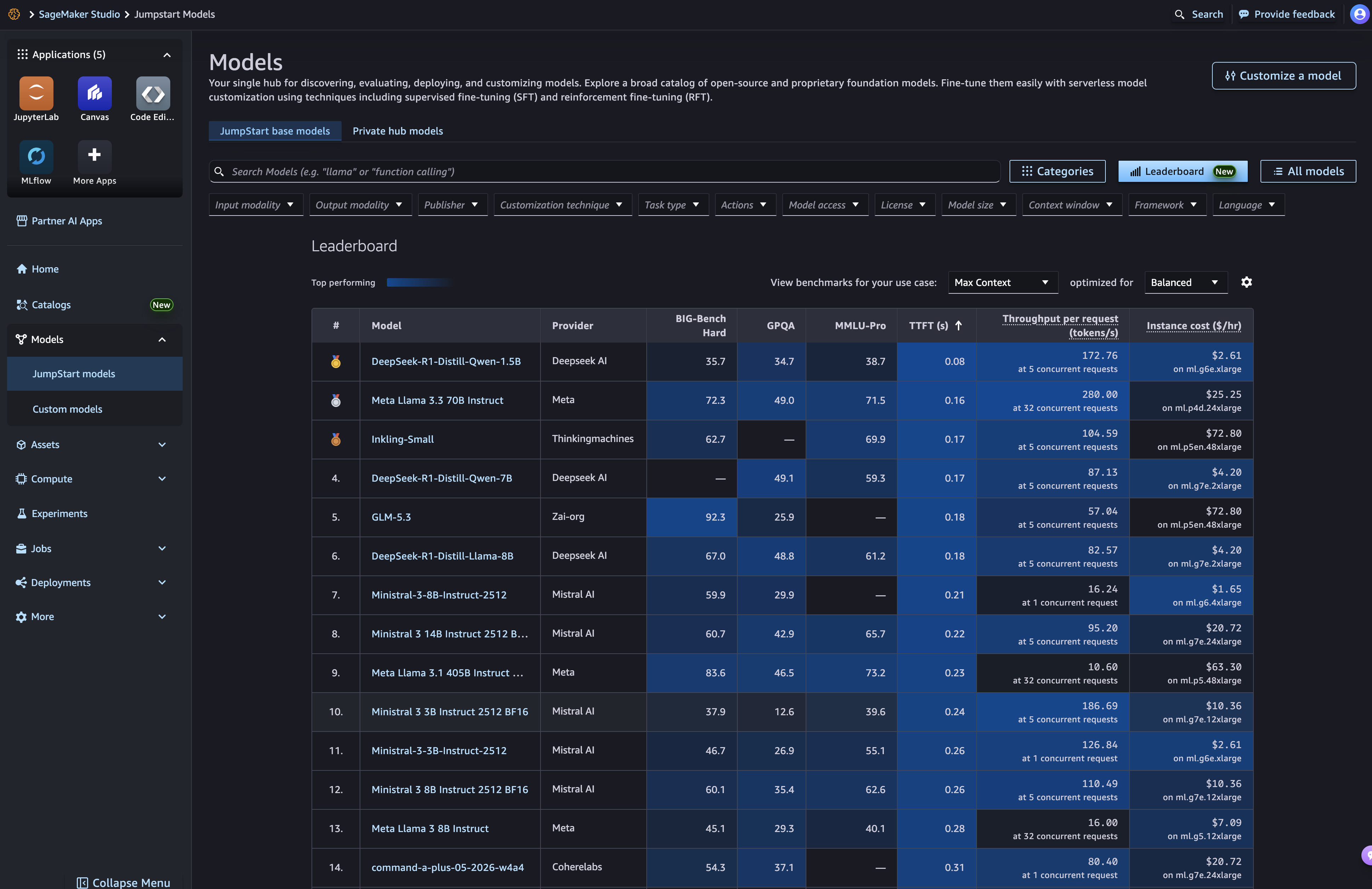
AWS announced the Amazon SageMaker JumpStart Model Leaderboard, a new view inside Amazon SageMaker Studio that lets you compare JumpStart models side by side on quality, speed, and cost. It sits next to the existing Categories and All models views on the JumpStart base models page, uses the same search bar and filters, and opens directly on a ranking of large language models without asking setup questions first. At launch it covers more than 70 models from providers including Meta, Google, Qwen, IBM, and Arcee, and AWS says more will be added over time.
Each model entry carries two kinds of numbers. The first is quality scores on three public benchmarks, BIG-Bench Hard, GPQA Diamond, and MMLU-Pro, which AWS runs itself with an identical evaluation setup for every model. BIG-Bench Hard tests multi-step reasoning such as logical deduction and arithmetic; GPQA Diamond uses graduate-level science questions that are hard to answer by searching the web; MMLU-Pro covers broad knowledge across subjects like science, law, and engineering with harder multiple-choice questions. Higher is better on all three, and the leaderboard reports them separately rather than collapsing them into one composite score, so you can weight whichever benchmark matches your application.
The second kind is performance and cost data, gathered by sending a standardized test workload to an endpoint deployed with each JumpStart deployment configuration, the same configurations a customer can launch. The reported metrics are time to first token (TTFT), throughput per request in tokens per second, and estimated instance cost in dollars per hour. Because quality and performance figures come from one place and one method, AWS argues the comparison is like-for-like instead of stitched together from different published sources.
Two menus control which performance numbers appear. A use case profile menu, defaulting to Max Context, changes only the performance and cost columns; quality scores are identical across profiles. An optimization goal menu, defaulting to Balanced, selects among a model's deployment configurations: Balanced shows the configuration with the lowest estimated cost per token, Cost optimized shows the lowest hourly instance price (potentially with higher latency and lower throughput), Latency optimized shows the lowest TTFT, and Throughput optimized shows the highest throughput, and those configurations may use speculative decoding. In practice, the profile matters because latency and throughput trade off differently for a chat assistant than for overnight batch document processing.
Cost estimates deserve care. The figure reflects only SageMaker instance cost at the on-demand hourly rate for the configuration's default instance type. It excludes data transfer, storage, inference component costs, and discounts such as Reserved Instances or Savings Plans, so actual bills will differ; AWS points users to its Pricing Calculator for real estimates.
The workflow runs from filtering to deployment. In SageMaker Studio you open the Models page and select Leaderboard, which has its own shareable URL. You narrow the list with existing filters such as license, provider, and input or output modality, applying hard requirements like a commercially usable license before looking at scores. After choosing a profile and optimization goal, you read a blue heatmap where deeper color marks stronger results in each column, sort by any metric, and hide columns via a settings gear. Model names stay frozen during horizontal scrolling. Selecting a model opens its page with options to deploy or, for eligible models, customize serverlessly; AWS recommends deploying with the same use case and optimization goal you compared on, since every metric belongs to the configuration it was measured on.
A worked example illustrates the tradeoff. An internal help-desk assistant filtered to a commercial license and a chat-like profile with Latency optimized might shortlist three fictional models: a large one scoring 95.9 on BBH and 87.2 on MMLU-Pro but at 2.33 seconds TTFT, 37 tokens per second, and $37.66 per hour; a medium one at 94.2 and 84.9 with 0.98 seconds TTFT, 44 tokens per second, and $5.75 per hour; and a small one at 77.4 and 66.1 with 0.27 seconds TTFT, 61 tokens per second, and $2.61 per hour. The medium model looks like the sensible start for a help desk, with the small one as a cost fallback.
AWS lists several caveats. Benchmarks measure general ability, so the leaderboard should build a shortlist rather than make the final call; top candidates should be tested on your own data and prompts. Scores from different benchmarks are not comparable to each other. Reasoning and non-reasoning models are evaluated with different generation parameters, and GPQA Diamond scores for reasoning models are averaged over 10 passes, so cross-type comparisons are approximate. Small score gaps may fall within normal run-to-run variation and should be treated as ties. Coverage is uneven: some JumpStart models lack scores yet, and a missing score does not imply a weak model.
Looking ahead, AWS says it is exploring private hub support so organizations using curated JumpStart private hubs can see leaderboards for approved models, additional task leaderboards beyond LLM text generation such as object detection, text embeddings, and image understanding, and more models and benchmarks over time.
This suggests the leaderboard is as much a deployment-configuration guide as a model ranking. The same model can look cheap or expensive, fast or slow, depending on which JumpStart configuration you launch, so the measured numbers are only as predictive as the match between your production setup and the configuration you compared. A likely trade-off is that internally generated scores are consistent but not directly comparable with third-party leaderboards that use different prompts, settings, or hardware, so teams should treat them as a screening tool. Open questions include how frequently results are refreshed and how quickly new models get benchmarked; the announcement does not commit to a cadence.
Why it matters: Teams choosing among the many open-weight models on JumpStart can now compare quality, latency, throughput, and instance cost in one place, measured under one method and mapped to the deployment configurations they can actually launch. That should shorten shortlisting and make cost-versus-latency tradeoffs visible early. The caveats remain: the dollar figures are instance-only and exclude discounts and ancillary costs, and the benchmark scores reflect general ability rather than your workload, so in practice teams will still need to validate the top few candidates on their own prompts before committing to production.
Based on reporting from the original publisher. Visit the source for full context and later updates.
Publisher excerpt
The Amazon SageMaker JumpStart Model Leaderboard compares 70+ foundation models side by side on quality, speed, and cost, directly in SageMaker Studio. Learn what the leaderboard shows, how AWS benchmarks models, and how to go from a shortlist to a deployed model.