Configure the ChatGPT desktop app with Amazon Bedrock in AWS GovCloud (US)
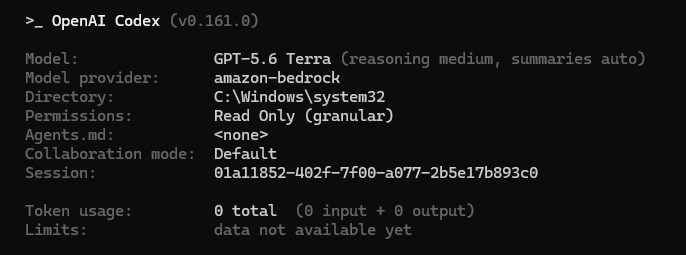
AWS published a walkthrough for running the ChatGPT desktop app and OpenAI's Codex coding agent against Amazon Bedrock inside AWS GovCloud (US), with model inference routed through the Bedrock Mantle endpoint in us-gov-west-1. The guide is aimed at organizations whose security architecture requires inference to use GovCloud identities, endpoints and regional controls, and it describes a controlled local deployment that an agency security team can test and document before approving wider use. AWS notes explicitly that using GovCloud and following the guide does not by itself authorize a workload; the customer remains responsible for reviewing the model, services, region, endpoint, workstation controls, repositories, credentials and data flows against its system security plan.
The app ships two capabilities. Work handles larger tasks requiring planning, research, files and a finished result. Codex is the coding agent for developing, testing and reviewing software, and it is reachable through the desktop app, the Codex CLI, and IDE integrations for Visual Studio Code, JetBrains and Xcode. Requests go through the Responses API on Bedrock rather than to OpenAI's own endpoints. For data residency, processing stays within the Bedrock region the customer selects. Commercial terms are per-token, with no seat licenses and no per-developer commitments, and zero data retention is supported: prompts and responses are processed without being written to durable storage by AWS and are not shared with model providers.
A structural point for anyone planning a rollout: because traffic goes through AWS directly, ChatGPT workspace rules and user roles no longer govern the deployment. The controls that matter are device policy files and the AWS identity and permissions in use. In practice that shifts governance work to the platform and security teams managing endpoints and IAM, and it means existing ChatGPT admin console settings are not the enforcement layer.
Authentication is handled in one of two ways. The app first looks for an AWS_BEARER_TOKEN_BEDROCK environment variable, which for desktop use can be supplied through the .codex/.env file in the user profile on Windows, Linux or macOS; when present it overrides profile-based authentication. Otherwise the app falls back to the standard AWS SDK credential chain, reading credentials and profile settings from the usual .aws directory and supporting SSO profiles backed by IAM Identity Center, which obtain temporary role credentials from a cached session without storing them by hand. The walkthrough uses a named profile called codex-il5. AWS warns against putting credentials, bearer tokens or session tokens into TOML files, and recommends shielding the profile configuration, credential source, SSO token cache and any credential helper from writes by app tasks.
Configuration depends on two files that must exist before the app's first launch, since the app reads them at startup. An administrator-controlled requirements.toml sits in a system location (ProgramData on Windows, /etc/codex on Linux and macOS) and sets limits users cannot override, while a per-user config.toml in the .codex directory declares the provider, model and operating settings.
The baseline requirements file is the interesting part for security reviewers. It restricts login to API mode, allows only read-only and workspace-write sandbox modes, keeps the user as approvals reviewer, permits only disabled or cached web search, and turns off browser and computer use, appshots, remote control, login shells, MCP servers, feedback, image generation, memories, plugins, hooks and in-app updates. A granular approval policy leaves sandbox approval, MCP elicitations and request permissions off while enabling rule-based and skill approval. A domain allowlist under application.network permits only bedrock-mantle.us-gov-west-1.api.aws and explicitly denies a list of OpenAI hosts including api.openai.com, chatgpt.com, auth.openai.com and the GOV variants, plus telemetry and static-asset domains. A network proxy is enabled with managed domains only, upstream proxies and local binding disabled. This suggests the design intent is a sealed client that can only talk to one Bedrock endpoint; the breadth of the deny list reflects how many ancillary hosts a typical ChatGPT install would otherwise contact for auth, updates, telemetry and content delivery.
The config.toml side selects model_provider = "amazon-bedrock" with the model ID and profile substituted by the customer, forces API login, sets workspace-write sandboxing with network access off, and defines the provider block pointing base_url at the Mantle OpenAI-compatible path with wire_api = "responses" and requires_openai_auth = false, region us-gov-west-1 and the named profile. Analytics, feedback, OpenTelemetry exporters, memories, bundled skills and default apps are disabled, and prompt logging is off. On Windows the app uses the elevated sandbox with sandbox_private_desktop enabled, which the approved runtime must support.
Verification is visual: after installing and fully closing the app, then relaunching with both files in place, the Codex CLI /status tab and the desktop app settings should both show amazon-bedrock as the model provider. The troubleshooting notes cover a few failure modes: an OpenAI account prompt usually means the files are misplaced or stale processes survived a restart; an unsupported-endpoint error means the specific desktop or app-server release, endpoint and model need confirmation with OpenAI, since changing the URL alone does not establish support; a wrong AWS identity calls for checking whether a Bedrock API key is overriding the profile; and missing capability restrictions call for inspecting the effective requirements after restart, because API-only sign-in alone does not apply the capability policy.
Rollback guidance is to stop the rollout if a validation check fails, restore previously approved policy and provider settings, restart the app, revoke temporary credentials or API keys, confirm the devices can no longer reach Bedrock, and document the failure before retrying.
Why it matters: teams in regulated or government environments that were blocked from using OpenAI tooling by data residency or credential-handling rules now have a documented path to run the desktop client and coding agent with inference confined to GovCloud and billed per token. The trade-off is that the hardened baseline strips out a large amount of functionality, so this is likely to suit coding and analysis work more than the full consumer assistant experience, an inference from the feature flags rather than a stated AWS position. Platform engineers should plan for endpoint configuration management and credential hygiene as the primary controls, since the vendor-side workspace governance no longer applies.
Based on reporting from the original publisher. Visit the source for full context and later updates.
Publisher excerpt
The ChatGPT desktop app is now available on Amazon Bedrock in AWS GovCloud (US). This post walks through a controlled local deployment that routes model inference to Amazon Bedrock in AWS GovCloud (US-West) using API-mode sign-in, a managed device policy, a named AWS profile, and network restrictions, so a security team can validate it before broader use.