Manage Amazon SageMaker HyperPod Spaces directly from SageMaker Studio
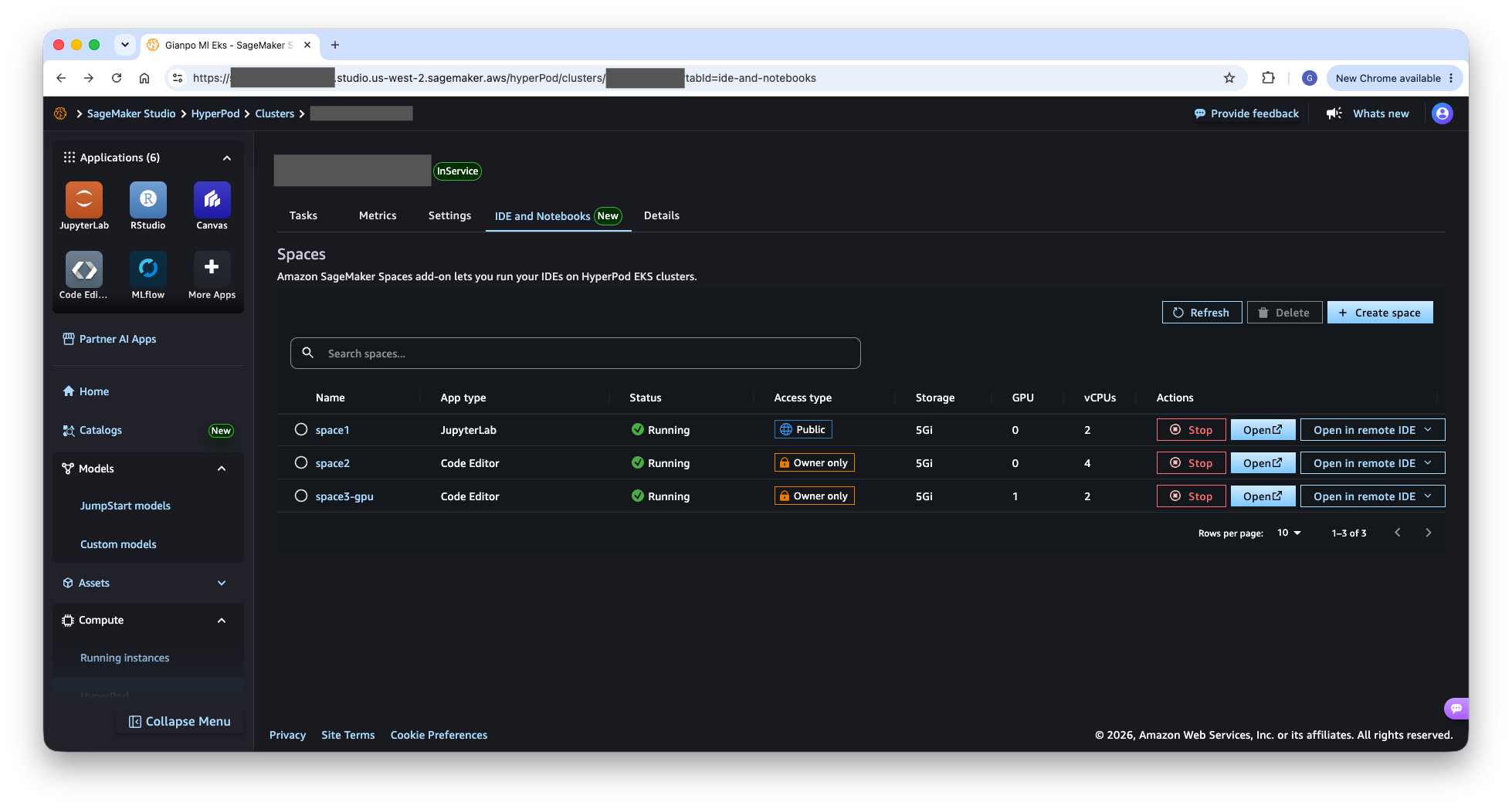
AWS introduced the ability to create and manage Amazon SageMaker Spaces on Amazon SageMaker HyperPod EKS clusters directly from the SageMaker Studio user interface. Data scientists and machine learning engineers can launch JupyterLab and Code Editor environments on HyperPod clusters without leaving the browser or using command-line tools.
A new IDE and Notebooks tab on the HyperPod cluster detail page provides a complete interface for Space management. Through Studio, users can create Spaces with configurable compute, namespaces, storage, HyperPod Task Governance for compute quota management, and image settings via a guided form. A searchable table shows each Space's name, application type, status, access type, storage, GPU, and vCPU allocations. Spaces can be started and stopped to free compute resources, opened in the browser, or connected through a remote IDE such as VS Code. Previously, creating and managing Spaces relied primarily on the HyperPod CLI or kubectl commands.
Setup involves administrators and data scientists. Administrators install the SageMaker Spaces add-on on the HyperPod EKS cluster using Quick install or Custom install, the latter required for web UI access, from the cluster's IDE and Notebooks tab. They also attach three managed policies — AmazonSagemakerHyperpodSpacePolicy, AmazonSagemakerHyperpodUserClusterPolicy, and AmazonSagemakerHyperpodSpaceTemplatePolicy — to the IAM roles used by data scientists, and enable per-user identity propagation on the Studio domain. AWS states existing running apps are unaffected and users pick up the new setting at their next sign-in.
Data scientists navigate to their HyperPod cluster in SageMaker Studio under Compute, then HyperPod, and select the IDE and Notebooks tab. AWS says a Space typically shows Running in a few minutes on a cold cluster, or approximately 30–40 seconds with over-provisioning. Remote VS Code connections use SSH-over-SSM tunneling.
Configuring the SageMaker Spaces add-on incurs no additional charges, according to AWS. Customers pay for underlying HyperPod cluster compute consumed by Spaces and a per-hour charge for the AWS Systems Manager Advanced On-Premises Instance used for SSH-over-SSM remote connectivity.
Based on reporting from the original publisher. Visit the source for full context and later updates.
Publisher excerpt
Data scientists and ML engineers can now create, configure, start, stop, and open Amazon SageMaker Spaces on SageMaker HyperPod EKS clusters directly from SageMaker Studio. Launch JupyterLab and Code Editor environments in a few clicks, without using command-line tools.