Workflow context for AI agents with Smartsheet MCP on AWS
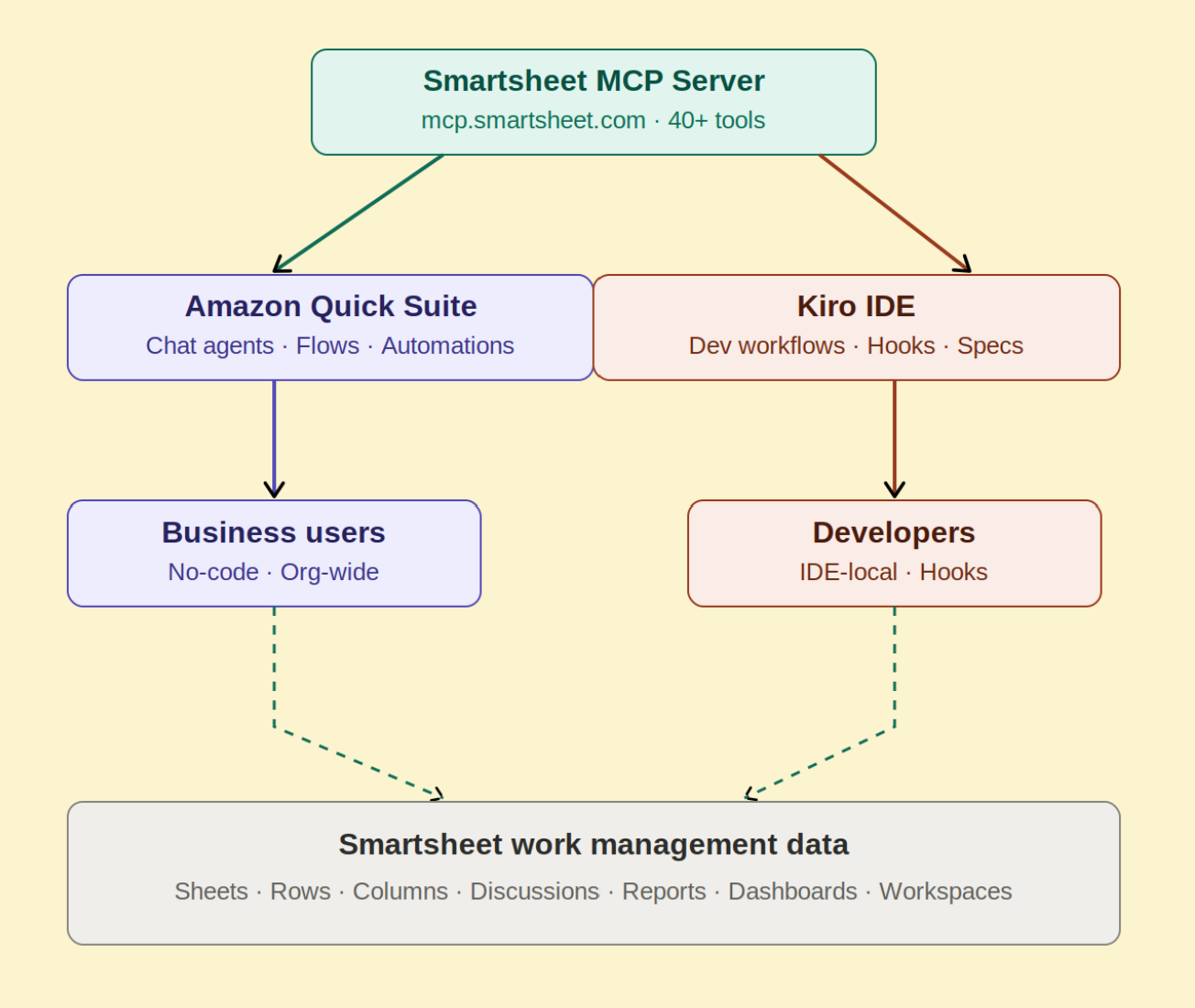
Smartsheet has shipped a generally available Model Context Protocol server, described by AWS in a post on its Machine Learning Blog, which lets AI assistants read, write and control Smartsheet workspaces through a standardized interface. The server exposes more than 40 tools covering sheets, rows, columns and automations, so an agent can change task statuses, add rows and restructure a project from natural language. The post focuses on two ways to wire it into existing work: the Amazon Quick agentic workspace used by project managers and operations staff, and Kiro, an agentic IDE used by developers.
Architecturally, the Smartsheet server is the middle layer. Amazon Quick and Kiro both act as MCP clients that connect to it directly, and the server in turn talks to Smartsheet's own API and data layer. In MCP terms, this is the standard split between a client (the AI application) and a server (the adapter that exposes an external system's capabilities as callable tools), which is what lets the same Smartsheet integration be reused across different agent products.
The server is reachable at three regional endpoints: https://mcp.smartsheet.com for commercial US, https://mcp.smartsheet.eu for the EU and https://mcp.smartsheet.au for Australia. It uses Streamable HTTP transport and supports MCP spec versions 2025-06-18 and 2025-03-26. Authentication is either OAuth 2.0 or a Smartsheet Personal Access Token, and each endpoint exposes the same toolset.
The two integration paths are meant for different audiences. Amazon Quick suits organizations that want a managed, company-wide deployment: Smartsheet appears as a pre-built connector in the Quick directory, and administrators configure OAuth app credentials, choose which tools to enable, and publish the connection to selected users. Kiro is the lighter developer route: a single JSON block added to .kiro/settings/mcp.json under a workspace, containing the endpoint URL and a bearer token header. The post notes that this PAT approach is convenient, while OAuth is the recommended option for production deployments. Kiro loads MCP servers as background processes at startup, after which the Smartsheet tools are available across chat, spec planning and hooks-based automation.
Concretely, the post sketches a sprint-tracking team. A project manager can ask Amazon Quick which tasks are blocked this week; the agent queries the server, pulls the relevant rows and returns a summary with owners and due dates drawn from live data, with no report or dashboard built in advance. A developer can ask Kiro for open backend tasks assigned to them, get the list inline, and rely on a Kiro hook to flip the corresponding row to Complete when a fix is committed.
Smartsheet's stated design choice is that the server returns structured context — row relationships, column types, cell history and comments — rather than raw API payloads. In practice, that means smaller, token-efficient responses, which matters because agent queries are billed and bounded by context windows; across hundreds of queries on a portfolio, the savings show up as lower cost and better latency. This is a sensible pattern for anyone building their own MCP server: shape responses for a model rather than mirroring a REST schema.
Prerequisites differ by path. Both need an AWS account with suitable IAM permissions, a Smartsheet account on a Business, Enterprise or AWM plan, and either a Personal Access Token or OAuth credentials. Quick additionally requires Author or higher permissions in the Quick account. Kiro requires the IDE from kiro.dev plus Node.js in the environment. Removing the integration means deleting the connector in Quick (which revokes the OAuth token) or dropping the smartsheet-us entry from the Kiro config and restarting the IDE.
On governance, Smartsheet positions the server as sitting on the same infrastructure and permission layer as its REST API rather than creating a new trust boundary. Agents see only what the authenticated user may see, so natural-language prompts cannot escalate privileges; administrators can switch AI features on or off globally and gate write tools by user group. Because the transport is Streamable HTTP, firewalls can be allowlisted by fully qualified domain name (mcp.smartsheet.com) rather than IP ranges. The server does not retain prompts — Smartsheet sees the structured tool calls and their results, with prompt content staying between the AI client and the model. A likely trade-off is that this design puts prompt-level auditing on the client side, so teams in regulated settings may need logging in Quick, Kiro or their model provider rather than looking to Smartsheet for it.
The post closes with four automation patterns that chain tools together: sweeping active sheets for Blocked or At Risk rows and commenting a structured summary to the team (get_sheet_summary, search, create_discussion_on_row); reconciling statuses between an issue tracker and a Smartsheet plan and updating drifted rows (get_sheet_summary, get_columns, update_rows, create_discussion_on_row); assembling project health briefings across reports and dashboards (list_reports, get_report, list_dashboards, get_dashboard, search); and appending a discussion comment after every write to leave a human-readable audit trail inside Smartsheet.
Why it matters: teams that keep plans in Smartsheet can now let agents act on those plans rather than just read a status page, and the two documented paths cover both business users through Quick and developers through Kiro. For developers, the smoke test of any MCP integration is whether write access is properly scoped and auditable, and the user-level permission enforcement plus configurable write tools address that directly, with the caveat that the PAT configuration is a convenience rather than the recommended production setting. My inference is that the sharper near-term effect is on workflow design: with tool calls like update_rows paired to create_discussion_on_row, agents can leave a trail in the same system of record they modify, which is the kind of pattern compliance-minded teams will likely ask for before they let agents write to project plans.
Based on reporting from the original publisher. Visit the source for full context and later updates.
Publisher excerpt
The Smartsheet Model Context Protocol (MCP) Server lets AI agents read, update, and act on live data. This post shows two ways to connect it on AWS: Amazon Quick for business teams and Kiro for developers, so your agents can work with Smartsheet without switching tools.